
Blog
How to use an old phone as a baby monitor
Updated
You can use an old phone as a baby monitor by installing a baby monitor app on it and on your own phone. The spare phone points at the cot and films, and your phone shows the live video, plays the sound and alerts you when your baby stirs. You don’t need any extra hardware.
What you need
- A spare phone. An old iPhone or Android phone you no longer use is ideal. With Awake, iPhones need iOS 16.4 or later.
- Your own phone, to watch and listen.
- An internet connection on both phones. Home Wi‑Fi works well.
- A charger for the spare phone, because video uses battery all night.
- A baby monitor app on both phones. This guide uses Awake, which is a free download on the App Store and Google Play.
Set it up in a few minutes
- Install Awake on both phones.
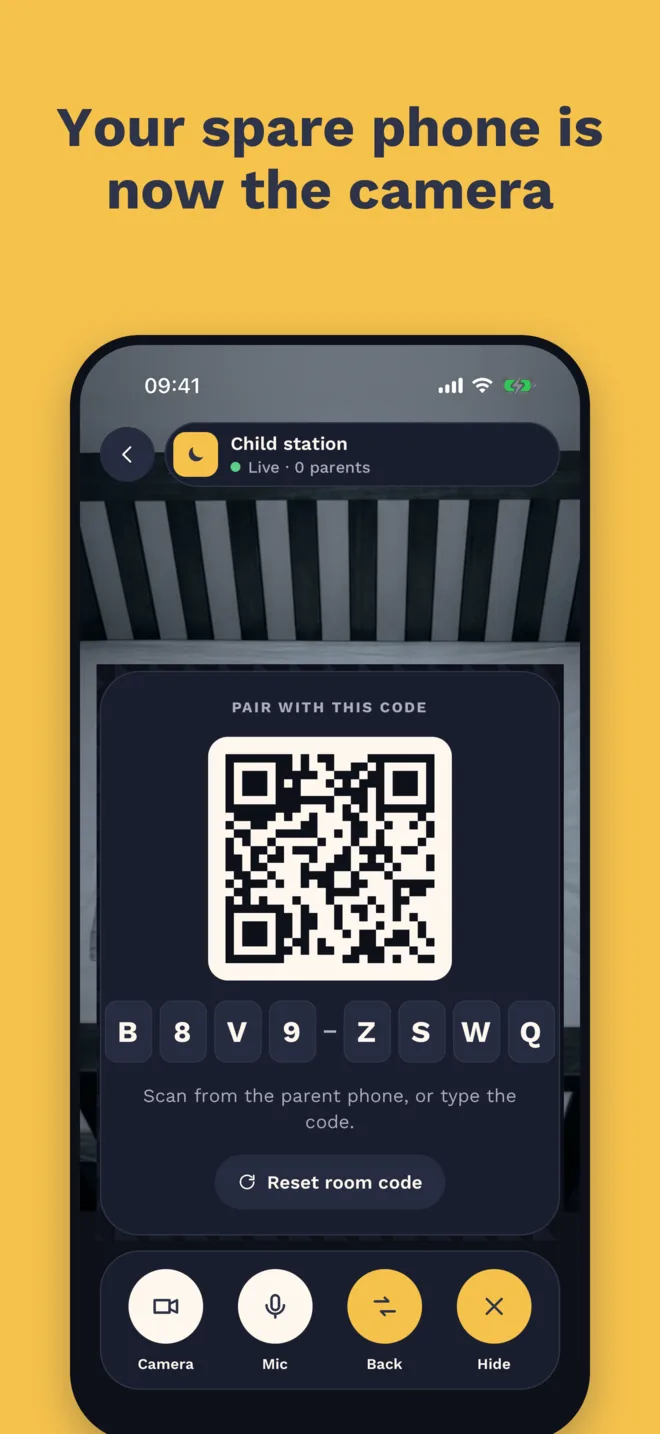
- On the spare phone, choose Be the camera. A QR code and a room code appear.
- On your phone, choose Watch & listen.
- Scan the QR code, or type the room code.
- Place the spare phone where it can see the cot, then plug it in.
That’s it: the live view appears on your phone. If you’d like the full walkthrough, read how to use two phones as a baby monitor.
Where to put the camera phone
- Somewhere stable, with a clear view of the cot, such as a shelf or a stand.
- Out of your baby’s reach, with the charging cable out of reach too.
- Not in the cot or attached to it.
For safe-sleep advice, follow the NHS guidance or the American Academy of Pediatrics.
What you get
- Live video and sound on your own phone.
- Movement and sound alerts, so you know the moment your baby wakes.
- Privacy. With Awake, video goes straight from phone to phone. Nothing is uploaded or stored, and there’s no account to create.
- Room for more parents. Up to three parents can watch the same camera phone on their own phones, depending on your plan.
Is it free?
Awake is free to download. To keep monitoring you choose a plan: one parent, or up to three parents. You can pay monthly, with a 7-day free trial, or pay once for lifetime access.
A few tips
- Keep the camera phone charging for the whole night.
- Check the connection before bedtime: start the camera, then make sure the live view appears on your phone.
- Turn on notifications on your own phone, so alerts can reach you.
- If the phones can’t connect, see the support page. Both phones need internet.
Awake is not a medical device and does not replace adult supervision.